
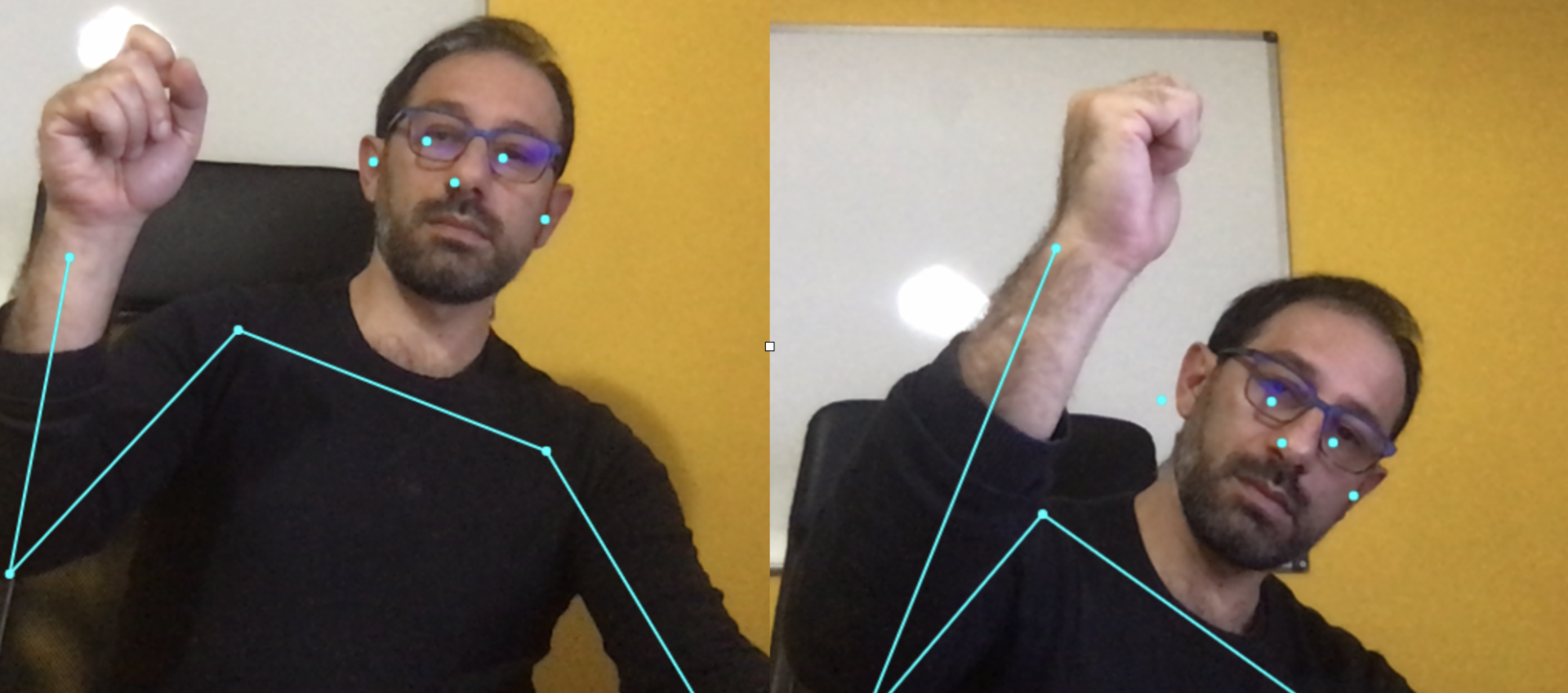
How to Use PoseNet with TensorFlow.js to Assess Body Movement
In this article I want to give you an example of how it is possible to detect the body’s position through the use of a pre-trained neural network called posenet released by Google. PoseNet is, in fact, a vision model that can be used to estimate a person’s position/posture. I rewrote an example in JavaScript in its most elementary/essential form for a better understanding of the context. I present the example and will comment on it below. In the meantime, you can observe the result directly through the live example. Do not worry, no information from the webcam will be stored, so you can safely enable it. For convenience I leave here the example code.
Array of body positions … Please wait a moment
var imageElement;
var c;
var ctx;
jQuery(document).ready(function(){
setTimeout(function(){
startVideo();
c = document.getElementById(“myCanvas”);
ctx = c.getContext(“2d”);
}, 3000);
})
function startVideo() {
var video = document.querySelector(‘video’),canvas;
imageElement=video;
console.log(“navigator ” + navigator.mediaDevices)
if (navigator.mediaDevices) {
// access the web cam
navigator.mediaDevices.getUserMedia({ video: true })
// permission granted:
.then(function(stream) {
//video.src = window.URL.createObjectURL(stream);
video.srcObject = stream;
getSinglePose(imageElement);
})
// permission denied:
.catch(function(error) {
document.body.textContent = ‘Could not access the camera.Error:’ + error.name;
});
}
return imageElement;
}
function getSinglePose(imageElement)
{
posenet.load().then(function(net) {
const pose = net.estimateSinglePose(imageElement);
return pose;
}).then(function(pose){
var keypoints = new Array();
keypoints=pose.keypoints;
var poseElement = document.getElementById(‘poseElementId’);
poseElement.innerHTML=””;
for (index=0;index<17;index++)
{
poseElement.innerHTML += keypoints[index].part + " " + keypoints[index].position.x + " " + keypoints[index].position.y + "
“;
}
getSinglePose(imageElement);
})
}
#myCanvas {
position: absolute;
left: 9;
top: 9;
}
video#videoElement {
margin: 0;
top: 0;
left: 0;
}
The HTML code is really minimal; you will need to insert the instructions to load the model and TensorFlow and prepare the canvas for handling the images/frames captured by the webcam.
<html>
  <head>
    <!-- Load TensorFlow.js -->
    <script src="https://cdn.jsdelivr.net/npm/@tensorflow/tfjs"></script>which
    <!-- Load Posenet -->
    <script src="https://cdn.jsdelivr.net/npm/@tensorflow-models/posenet"></script>
 </head>
  <body>
    <div id="Container">
            <video autoplay="true" width="640" height="480" id="videoElement"></video>
            <canvas id="myCanvas" width="640" height="480"></canvas>
            <p><span id ="poseElementId">Array of body positions ... Please wait a moment</span></p>
    </div>
  </body>
</html>
 var imageElement;
    var c;
    var ctx;
        setTimeout(function(){
         startVideo();
         c = document.getElementById("myCanvas");
         ctx = c.getContext("2d");
    }, 3000);
This function will start the webcam and call the inference function (getSinglePose) to compute the body’s positions
   function startVideo() {
        var video = document.querySelector('video'),canvas;
        imageElement=video;
        console.log("navigator  " + navigator.mediaDevices)
        if (navigator.mediaDevices) {
            // access the web cam
            navigator.mediaDevices.getUserMedia({ video: true })
                // permission granted:
                .then(function(stream) {
                 //video.src = window.URL.createObjectURL(stream);
                     video.srcObject = stream;
                     getSinglePose(imageElement);
                })
                // permission denied:
                .catch(function(error) {
                    document.body.textContent = 'Could not access the camera.Error:' + error.name;
                });
        return imageElement;
    }
The script that performs the prediction and pose estimation is equally simple to read:
function getSinglePose(imageElement) {
      posenet.load().then(function(net) {
            const pose = net.estimateSinglePose(imageElement);
            return pose;
          }).then(function(pose){
           var keypoints = new Array();
           keypoints=pose.keypoints;
           var poseElement = document.getElementById('poseElementId');
           poseElement.innerHTML="";
           for (index=0;index<17;index++)
           {
               poseElement.innerHTML += keypoints[index].part + " " + keypoints[index].position.x + " "
                     + keypoints[index].position.y + "<br>";
           }
           getSinglePose(imageElement);
        })
}
Position estimation (estimateSinglePose) uses computer vision techniques capable of detecting human figures in images and video, so that it can determine, for example, where the elbow, the eyes, the nose, etc. are located. To be clear, this model does not perform person recognition but only tracks postural movements. The algorithm simply locates where the body’s joints are — the keypoints — indexed and identifiable with an “ID”. The estimation result also returns a confidence score between 0.0 and 1.0. Below is the label map used to train the model:
| Id | Recognized body part |
|---|---|
| 0 | nose |
| 1 | leftEye |
| 2 | rightEye |
| 3 | leftEar |
| 4 | rightEar |
| 5 | leftShoulder |
| 6 | rightShoulder |
| 7 | leftElbow |
| 8 | rightElbow |
| 9 | leftWrist |
| 10 | rightWrist |
| 11 | leftHip |
| 12 | rightHip |
| 13 | leftKnee |
| 14 | rightKnee |
| 15 | leftAnkle |
| 16 | rightAnkle |
Comments